

Parts Quality & Availability
Part options vary by model, availability, and supplier stock, and not every repair will have every tier available. This mostly pertains to popular smartphone and tablet repairs. Computers, consoles, and other devices are more varied and we will discuss specifics for part quality and availability before repair.
1. Key Terms
Display Types
LCD vs OLED
- LCD uses a backlight, usually costs less, and often has weaker blacks and contrast.
- OLED lights each pixel individually, giving deeper blacks, stronger contrast, and a more premium appearance.
- Brightness and color accuracy are often noticeably better on higher quality OLED panels.
Screen Construction
Hard OLED vs Soft OLED
- Soft OLED is closer to original construction and usually offers better fit and durability.
- Hard OLED is more rigid, usually cheaper, and often a step below soft OLED in overall quality.
- Premium aftermarket screens are more likely to use soft OLED or other higher quality panel options.
Display Smoothness
Refresh Rate
- 60Hz = standard smoothness.
- 90Hz / 120Hz = smoother scrolling and animations.
- iPhone: iPhone 12 series and older are 60Hz. iPhone 13 series and newer non-Pro models are still 60Hz. iPhone 13 Pro models and newer Pro models use 120Hz ProMotion.
- Samsung: budget models are usually 60Hz, midrange models can be 90Hz or 120Hz, and many flagships use adaptive 120Hz.
Battery Options
Standard vs High Capacity
- Standard capacity aims to match original battery size and behavior.
- High capacity aims to provide a higher capacity rating than factory, allowing for longer usage.
- Higher capacity batteries may also have a calibration cycle before battery life readings stabilize.
Warnings & Records
System Messages / Service History
- Some devices may show messages after repair, especially on newer iPhones.
- These messages generally do not affect normal performance.
- They may affect trade-in value or warranty status with certain carriers.
- Service history may also record that a screen, battery, or other component has been replaced, when, and whether or not it is “genuine”. Availability, menu wording, and service history behavior can vary by model and software version.
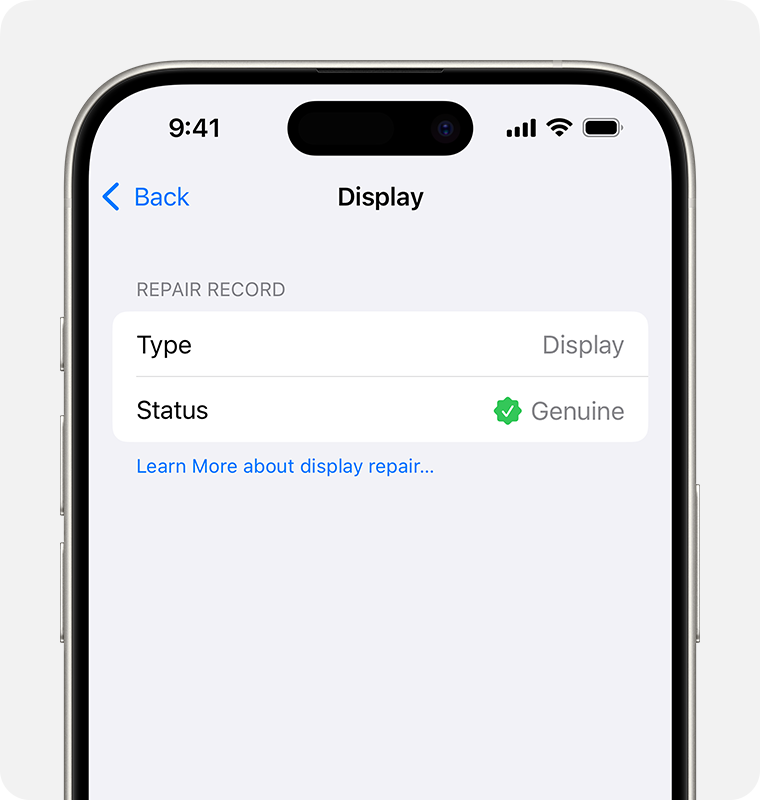
Example of parts and service history wording. Menu labels and behavior can vary by device and software version.
2. Part Availability
- Not every model has all quality tiers available at all times.
- Newer, less common, or lower-volume devices may have fewer reliable part options.
- Some repairs may only have one quality level that is worth offering.
- Availability can change based on supplier stock, quality control, and market demand.
- Some devices may only have parts available from third-party marketplaces such as Amazon, eBay, or AliExpress.
- Quality is less predictable.
- Warranty coverage may be limited.
- Some repairs or non-original parts can also affect manufacturer warranty or trade-in eligibility with certain carriers.
3. Screen Quality Comparison
Budget Aftermarket
Lower-cost repair option
Examples: economy LCD, lower-grade hard OLED, entry-level aftermarket
Lowest CostPros
- Good option when keeping cost low is the main priority.
- Can be a practical choice for data recovery or device trade-in situations.
- Can be enough for older devices or temporary use.
Cons
- Brightness and color accuracy are usually below premium and original options.
- May be thicker and can sit slightly more raised from the frame.
- Notch, chin, or bezel proportions may be larger than original.
- Higher defect risk and lower durability than better tiers.
Premium Aftermarket
Best value for most repairs
Examples: soft OLED, higher quality aftermarket OLED, better aftermarket panel options
Most PopularPros
- Closer to original in brightness, color, fit, and touch feel.
- Usually the best balance of quality and price for daily-use devices.
- More likely to match the original display type and feel more refined overall.
- Lower defect rate than budget options.
Cons
- May not be available for brand new models.
- Can still show as “non-genuine” in the parts & service history menu.
Original
Closest to factory quality
Examples: premium refurbished original, OEM pull, original-spec screen assemblies
Closest to FactoryPros
- Best match for brightness, color accuracy, and overall display feel.
- Best fitment and lowest visual compromise.
- Best fit for customers who want the closest result to original.
Cons
- Usually highest cost.
- May be harder to source consistently.
- Only service-pack parts sourced directly from the manufacturer are typically guaranteed to show as “genuine”; OEM pulls may show “used” and refurbs may show “not genuine”.
Customers should check with their specific carrier for trade-in requirements before choosing a specific part for repair. This mostly pertains to popular smartphone and tablet repairs. Computers, consoles, and other devices are more varied and we will discuss specifics for part quality and availability before repair.
4. Battery Quality Comparison
Aftermarket Standard Capacity
Closest to normal replacement spec
Balanced Value
- Aims to match original battery capacity rather than exceed it.
- Usually the safest and most straightforward option for most repairs.
- Performance depends heavily on the supplier and quality control.
Aftermarket High Capacity
Higher advertised capacity
Longer Usage
- Aims to provide a higher capacity rating than factory, allowing for longer usage.
- Best when sourced from our trusted battery suppliers with good consistency.
- May require a calibration cycle before readings and runtime settle in normally.
Original
Closest to factory battery behavior
Factory-Style Option
- Best fit for customers who want the most original-style result.
- Usually strongest option for consistency when available and sourced well.
- May cost more and be harder to source depending on model.
Broken back glass can increase the risk of pressure, puncture, contamination, or accidental damage around the battery area during use or future service. Damage related to broken glass or other physical damage is not covered under warranty.
Questions? Feel free to contact us directly or fill out our contact form.